2.4. Filter
The decoding yields the following results:
The brightness \(\hat{a}\) is a measure for the reflectance (resp. absorption) of the surface.
The modulation \(\hat{b}\) is a measure for the glossiness (resp. scattering) of the surface.
The coordinate \(\hat{x}\) is a measure for the local shape or slope of the surface. It is the screen position where each camera pixel, i.e. each camera sight ray, was looking at (got deflected to) during the fringe pattern recording.
 1"""Decode fringe pattern sequence."""
 2
 3from fringes import Fringes
 4import matplotlib.pyplot as plt
 5
 6f = Fringes()
 7I = f.encode()
 8
 9Irec = I  # todo: replace this line with recording data as in 'record.py'
10
11a, b, x = f.decode(Irec)
12
13# show first frame and first color channel of results
14plt.figure("coordinate 'x'")
15plt.imshow(x[0, :, :, 0])
16plt.colorbar()
17plt.figure("modulation 'b'")
18plt.imshow(b[0, :, :, 0])
19plt.colorbar()
20plt.figure("brightness 'a'")
21plt.imshow(a[0, :, :, 0])
22plt.colorbar()
23plt.show()
These results are in video shape,
so for the brightness \(\hat{a}\) and the coordinate \(\hat{x}\),
the usually two directions D
are along the first i.e. the time axis.
For the modulation \(\hat{b}\),
the modulation of the sets K for the directions D
are flattened into the first dimension;
you may reshape them as follows:
24b = b.reshape(f.D, f.K, *b.shape[1:])

Fig. 2.10 Brightness.

Fig. 2.11 Modulation.

Fig. 2.12 Coordinate.
2.4.1. Direct and Global Illumination Component
The direct illumination component is just twice the measured modulation:
\(I_D = 2 \hat{b}\).
The global illumination component can be determined with
\(I_G = 2 (\hat{a} - \hat{b})\)
under the condition that the spatial frequency \(\nu\) is high enough [Nay06].
Both can be normalized into the range [0, 1) by dividing through the maximal possible gray value \(I_{max}\) of the recording camera.
 1"""Direct and global illumination component.
 2https://dl.acm.org/doi/abs/10.1145/1179352.1141977"""
 3
 4from fringes import Fringes
 5from fringes.filter import direct, indirect
 6import matplotlib.pyplot as plt
 7
 8f = Fringes()
 9f.v = 99, 100, 101  # spatial frequency 'v' must be high enough but still resolved by the recording camera
10
11I = f.encode()
12
13Irec = I  # todo: replace this line with the recorded data, cf. example in 'record.py' as in 'record.py'
14
15a, b, x = f.decode(Irec)
16
17d = direct(a)
18g = indirect(a, b)
19
20# show first frame and first color channel of results
21plt.figure("global 'g'")
22plt.imshow(g[0, :, :, 0])
23plt.colorbar()
24plt.figure("direct 'd'")
25plt.imshow(d[0, :, :, 0])
26plt.colorbar()
27plt.show()

Fig. 2.13 Direct illumination component.

Fig. 2.14 Global illumination component.
2.4.2. Visibility and Exposure
In an alternative formulation, the absolute quantities offset \(a\) and amplitude \(b\) of the phase shifting equation are replaced by the maximal possible gray value \(I_{max}\), the relative quantities exposure \(E\) (relative average intensity) and visibilty \(V\) (relative fringe contrast) [Fis12]:
\(I = a + b \cos(\varPhi) = I_{max} E [1 + V \cos(\varPhi)]\)
The two parameters \(E = \hat{a} / I_{max}\) and \(V = \hat{b_i} / \hat{a}\) describe the phase shifting signal \(I\) independently of the value range \([0, I_{max}]\) of the light source or camera. Both lie within the interval \([0, 1]\) with the additional condition \(E \le 1 / (1 + V)\); else, the radiance of the light source would be higher than the maximal possible value \(I_{max}\). Therefore, the valid values of \(V\) are limited for \(E > 0.5\). The optimal fringe contrast \(V = 1\) can be reached when \(E = 0.5\).
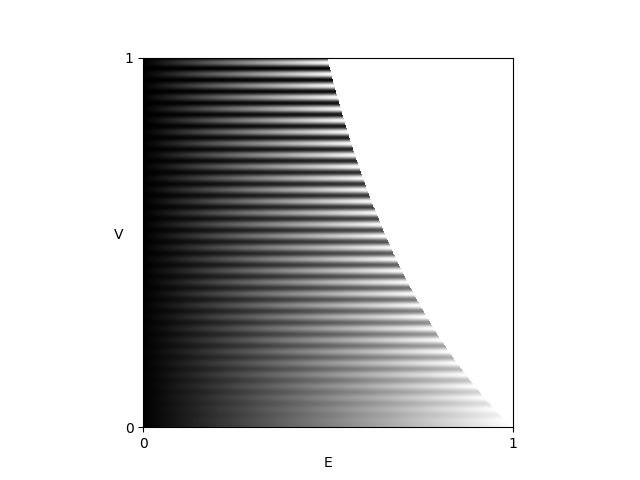
Fig. 2.15 Fringe pattern as a function of \(E\) and \(V\).
The advantage of this representation is the normalization of the descriptive parameters \(E\) and \(V\) and thereby the separation of additive and multiplicative influences.
The exposure \(E\) is affected by additional, constant light (not modulating the signal):
the maximum brightness of the light source,
the absorption of the sample
the absorption of optical elements (e.g. filters),
the exposure time and the aperture setting of the camera.
The visibility \(V\) is influenced by:
the maximum contrast of the light source
the surface quality of the sample (roughness, scattering),
the position of the sample with regard to focal plane of the lens (defocus and depth of field),
the camera lens’ modulation transfer function,
the camera’s resolution (the camera pixel size projected onto the light source acts as a low pass filter).
 1"""Visibility and Exposure."""
 2
 3from fringes import Fringes
 4from fringes.filter import visibility, exposure
 5import matplotlib.pyplot as plt
 6
 7f = Fringes()
 8I = f.encode()
 9
10Irec = I  # todo: replace this line with the recorded data, cf. example in 'record.py' as in 'record.py'
11
12a, b, x = f.decode(Irec)
13
14V = visibility(a, b)
15E = exposure(a, Irec)
16
17# show first frame and first color channel of results
18plt.figure("exposure 'E'")
19plt.imshow(E[0, :, :, 0])
20plt.colorbar()
21plt.figure("visibility 'V'")
22plt.imshow(V[0, :, :, 0])
23plt.colorbar()
24plt.show()

Fig. 2.16 Visibility.

Fig. 2.17 Exposure.
2.4.3. Verbose Results
Additionally to the already mentioned results brightness, modulation, coordinate,
visibility and exposure, more intermediate and verbose results can be returned
by setting the flag verbose in the method decode() to True:
 1"""Decode verbose results."""
 2
 3from fringes import Fringes
 4import matplotlib.pyplot as plt
 5
 6f = Fringes()
 7I = f.encode()
 8
 9Irec = I  # todo: replace this line with the recorded data, cf. example in 'record.py' as in 'record.py'
10
11# decode and return additional results:
12dec = f.decode(Irec, verbose=True)
13
14# make use of namedtuple:
15a = dec.a
16b = dec.b
17x = dec.x
18p = dec.p
19k = dec.k
20r = dec.r
21u = dec.u
22
23# show first frame and first color channel of results
24plt.figure("uncertainty 'u'")
25plt.imshow(u[0, :, :, 0])
26plt.colorbar()
27plt.figure("residuals 'r'")
28plt.imshow(r[0, :, :, 0])
29plt.colorbar()
30plt.figure("fringe order 'k'")
31plt.imshow(k[0, :, :, 0])
32plt.colorbar()
33plt.figure("phase 'p'")
34plt.imshow(p[0, :, :, 0])
35plt.colorbar()
36plt.show()
The phase … after temporal demodulation … link to fundamentals

Fig. 2.18 Phase.
The residuals … after optimization-based unwrapping … link to fundamentals

Fig. 2.19 Residuals.
The uncertainty … after temporal demodulation i.e. unwrapping … best/minimal uncertainty if ui is set and correct fringe orders are found … link to fundamentals

Fig. 2.20 Uncertainty.
2.4.4. Slope
If the deflectometric setup is calibrated, the slope of the surface can be computed from the coordinate.
“[Deflectometry] measures slopes (first order derivatives of the shape). The sensitivity to higher spatial frequencies is therefore amplified, resulting in excellent (sometimes excessive) sensitivity for small-scale irregularities and at the same time poor sensitivity and stability for low-order surface features.” [Bur23]
 1"""Slope."""
 2
 3from fringes import Fringes
 4import matplotlib.pyplot as plt
 5
 6f = Fringes()
 7
 8I = f.encode()
 9
10Irec = I  # todo: replace this line with the recorded data, cf. example in 'record.py' as in 'record.py'
11
12a, b, x = f.decode(Irec)
13
14s = x  # todo: compute slope from calibrated setup
15
16# show first frame and first color channel of results
17plt.figure("slope 's'")
18plt.imshow(s[0, :, :, 0])
19plt.colorbar()
20plt.show()


2.4.5. Curvature
“As an alternative use of [deflectometry] data, one may differentiate them and recover surface curvatures (combinations of second order shape derivatives […]. Unlike point positions and slopes, the latter are intrinsic local characteristics of the surface […] that are independent of its embedding in 3D space. As such, curvature maps are useful observables for various quality inspection tasks. Derivation of curvatures is less error-prone than shape integration and does not require accurate prior knowledge of the distance to the object.” [Bur23]
 1"""Curvature."""
 2
 3from fringes import Fringes
 4from fringes.filter import curvature
 5import matplotlib.pyplot as plt
 6
 7f = Fringes()
 8I = f.encode()
 9
10Irec = I  # todo: replace this line with the recorded data, cf. example in 'record.py' as in 'record.py'
11
12a, b, x = f.decode(Irec)
13
14s = x  # todo: compute slope from calibrated setup
15
16c = curvature(s)
17
18# show first color channel of result
19plt.figure("curvature 'c'")
20plt.imshow(c[:, :, 0])
21plt.colorbar()
22plt.show()